94% of Business Spreadsheets Contain Errors. One of Them Cost a Bank $6 Billion. What Are Yours Costing You?
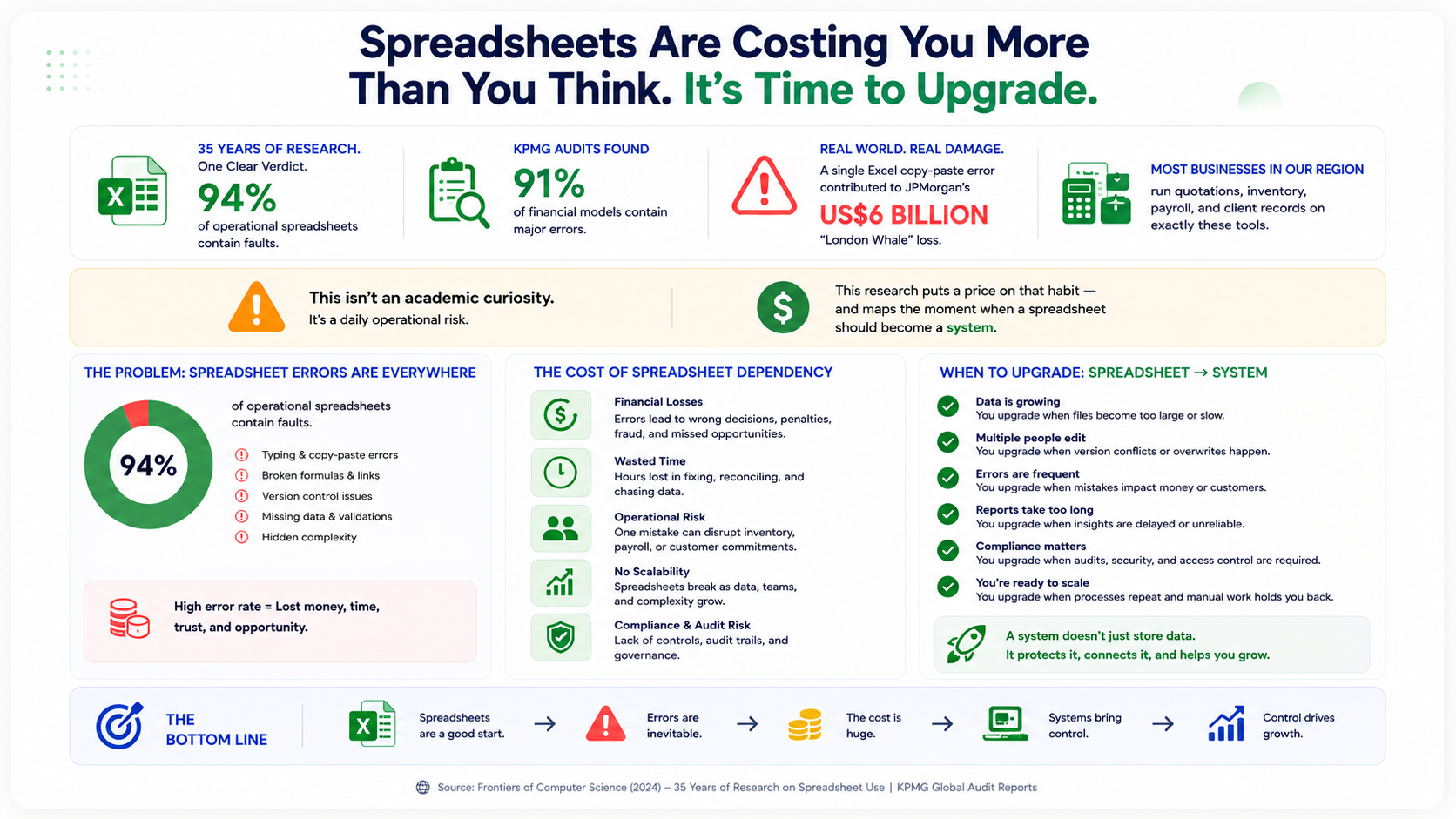
A 2024 review in Frontiers of Computer Science — covering 35 years of research on how businesses actually use spreadsheets — reached a verdict most owners feel but few quantify: about 94% of operational spreadsheets contain faults. This isn't an academic curiosity. A single Excel copy-paste error contributed to JPMorgan's US$6 billion "London Whale" loss; KPMG audits found major errors in 91% of the financial models they reviewed. Most businesses in our region run quotations, inventory, payroll, and client records on exactly these tools. This research puts a price on that habit — and maps the moment when a spreadsheet should become a system.
By the numbers
The insight
The evidence on spreadsheet reliability is remarkably consistent across four decades: the 2024 Frontiers of Computer Science review found ~94% of operational spreadsheets contain faults; Panko's research puts the average cell error rate around 5%; KPMG found major errors in 91% of audited financial models, and Coopers & Lybrand in 90%. The famous disasters — JPMorgan's $6 billion London Whale loss with its Excel copy-paste error, Toshiba's misstated forecasts, Canada's mispaid COVID relief — are just the visible tip. The research explains why: spreadsheet building shifted from trained IT professionals to millions of untrained business users, with no testing, no version control, and no access rules. For an SME, the cost shows up not as one headline disaster but as a steady leak: wrong quotations, unreconciled inventory, billing disputes, delayed month-end closing, and decisions made on numbers nobody can verify. This research quantifies the leak — and defines the threshold where a custom system pays for itself.
The challenge
Spreadsheets don't fail loudly; they fail silently, which is why the cost hides. Run the arithmetic on your own operation: at the researched ~5% cell error rate, a 5,000-cell pricing workbook carries roughly 250 mistakes — and any one of them can misprice a quotation you'll honor at a loss. The structural problems compound the math: one file emailed around becomes five conflicting "final" versions, so nobody knows which inventory count is true; formulas live in one employee's head, so a resignation is a systems failure; there are no access controls, so the entire client database sits on a laptop that can be copied in minutes (the insider risk our cybersecurity research prices at SAR 33 million per breach); and month-end becomes days of manual reconciliation between sheets that were never designed to agree. The trap is that each individual workaround is free, so the true cost — mispriced deals, leaked margins, slow closings, decisions on stale numbers — never appears on any invoice. That's what makes it the most expensive software most businesses run.
Our approach
The answer isn't ban Excel — it's knowing the threshold where a spreadsheet should graduate into a system. Our rule from the research and from building these systems: the moment a spreadsheet is (a) edited by more than two people, (b) feeding decisions about money — pricing, payroll, inventory, receivables — or (c) the only copy of business-critical data, it has outgrown the tool. The migration path we build follows the discipline spreadsheets lack: a single source of truth in a real database instead of dueling file versions; validation at the point of entry so a wrong price or duplicate SKU is rejected, not stored; role-based access so staff see what their job requires (and departures don't take the data with them); automation of the arithmetic that humans get wrong ~5% of the time — totals, VAT, stock levels, aging reports — and dashboards that show today's true numbers without a week of reconciliation. Built lean on Laravel, a system like this typically starts with the single most money-critical workflow (usually quotations or inventory), proves itself in weeks, then absorbs the next sheet. The spreadsheets stay — for what they're good at: throwaway analysis, not running the company.
Evidence
The research behind this
~94% of operational business spreadsheets contain faults; untrained end-user development is the root cause
Read the studyAverage cell error rate ~5.2% across operational spreadsheets — for large files, the question is how many errors, not whether
Read the studyKPMG: major errors in 91% of audited models (95% in a later survey); Coopers & Lybrand: errors in 90% of audited spreadsheets
Read the studyExcel copy-paste error contributed to JPMorgan's $6B London Whale loss; Toshiba forecast misstatements; Canada's COVID relief mispayments
Read the studyThe bridge
How Brain-Tech helps you capture this advantage
~5% of spreadsheet cells contain errors — a 5,000-cell pricing file carries ~250 mistakes
Every quotation and invoice built on that file is a coin toss on your margin
Custom quotation & invoicing systems with validation at entry — wrong numbers get rejected, not stored
Emailed spreadsheet copies create conflicting "final" versions — no single source of truth
Inventory counts, receivables, and client records that disagree cost real money to reconcile — and more when you don't
Central business systems on Laravel: one database, live dashboards, month-end in hours instead of days
Spreadsheets have no access control — the whole client database fits on one copied laptop
Insider-driven incidents are the region's most expensive breach vector (SAR 33M average, IBM)
Role-based access, audit logs, and encrypted data as standard in every system we ship
FAQ
Frequently asked questions
How common are spreadsheet errors really?
A 2024 review of 35 years of research found ~94% of operational business spreadsheets contain faults, with roughly 5% of cells in error on average. Professional audits agree: KPMG found major errors in 91% of financial models it reviewed.
What's the worst a spreadsheet error has done?
An Excel copy-paste error in a risk model was a contributing factor in JPMorgan's roughly US$6 billion "London Whale" trading loss. Toshiba's forecasting misstatements and Canada's COVID relief mispayments trace to spreadsheet faults too.
When should a business move from Excel to a custom system?
Three signals: the sheet is edited by more than two people, it feeds decisions about money (pricing, payroll, inventory, receivables), or it's the only copy of business-critical data. Any one of those means the spreadsheet has outgrown the tool.
Does replacing spreadsheets mean an expensive ERP project?
No — the pattern that works starts with one money-critical workflow (usually quotations or inventory) as a lean custom system, proves itself in weeks, then absorbs the next sheet. Spreadsheets stay for throwaway analysis — just not for running the company.
Find out what your spreadsheets are really costing you
Brain-Tech turns error-prone spreadsheets into lean, secure business systems — one database, validated entry, role-based access, and dashboards that show today's real numbers. Ask us for a free spreadsheet risk review: send us a description of the sheets running your business, and we'll map which one is leaking the most money and what replacing it would look like.
Get my free spreadsheet risk review